Confidence Index

Confidence Index

To support the verification of Self Assessment quality, a Confidence Index has been introduced. This index helps ensure that assessments are completed with appropriate care, detail, and intentionality.

Within a self assessment, the Confidence Index can be seen from the assessment summary page after the assessment has been filled out.


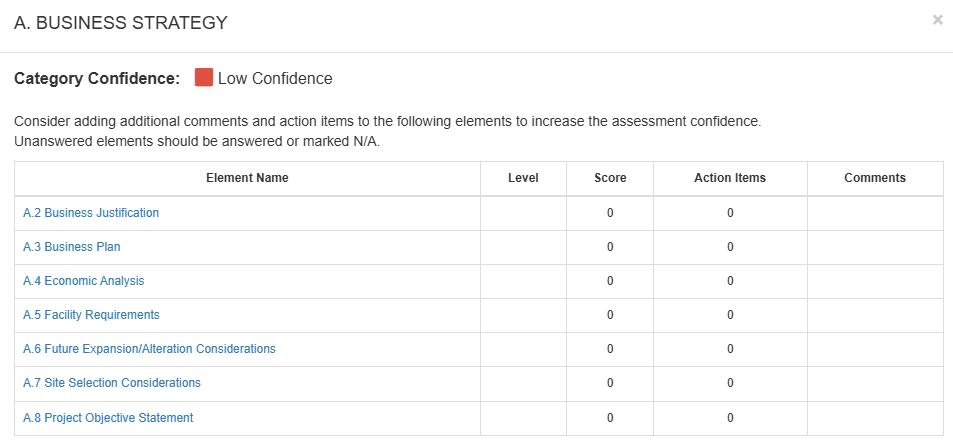
Categories are either marked as High Confidence (green checkmark icon), Moderate Confidence (yellow exclamation icon) or Low Confidence (red exclamation icon). If fewer than 50% of the elements within a category or assessment have been answered, the confidence displays as Incomplete (grey exclamation icon). Additional elements must be filled out before the Confidence score can be reliably calculated.

Confidence is calculated using key data points and is displayed at both the category level and the overall assessment level. It provides feedback to help assessors understand the completeness and quality of their responses.

On the assessment summary page, the confidence icon for a category can be selected to open an overview of the moderate to low confidence elements within that category. Within this overview, the number of action items and comments for each element are displayed so the assessor can easily determine where they can add more information into the elements to improve the category confidence. Assessment elements that require more detail are hyperlinked for quick navigation into the assessment to make changes to the element.


    • Related Articles

    • Share Assessments (PDRI)

      To share a Project Definition Rating Index (PDRI) assessment with team members, From the Carve Project Dashboard, click on the name of the project that contains the assessment. Click the drop-down to the right of the correct assessment. Click share. ...
    • Manage Projects and Assessments Overview

      Within Carve, Assessments are contained in Projects, which can be assigned to Portfolios. Projects can contain Project Definition Rating Index (PDRI) Assessments, Construction Readiness Assessments (CRA), and Commissioning & Operational Readiness ...
    • Create Self Assessments

      Admin, Facilitator, and Project Manager users have the ability to create and manage self assessments within Carve. Self assessments allow Project Managers to independently evaluate their projects using the same structure as facilitated assessments, ...
    • Manage Action Items Overview

      Action items are created during the facilitated Project Definition Rating Index (PDRI) Assessment, Construction Readiness Assessment (CRA), or Commissioning & Startup Readiness (CSU) Assessment during the element/factor review or from the Action ...
    • Copy Action Items from Previous Assessment

      Facilitators can update the status of action items and copy action items from a previous assessment to a new assessment (e.g. from Project Definition Rating Index (PDRI)-2 to a PDRI-3 assessment or from Construction Readiness Assessment (CRA) ...